

How a Browser Works

Browser
Browser is an application software used to explore world wide web.It is a runtime enviornment whose main job is to :
Understand HTML, CSS, and JavaScript
Fetch Files from internet
Convert them into pixels on your screen
Handle user interactions (clicks, typing, scrolling)
Store data (cookies, cache, localStorage)
Keep everything fast, secure, and responsive
We can consider it as a mini OS for the web.
Core Architecture of Browser
When we use browser the UI like address bar and search button sends the request to the Browser engine which tells Rendering Engine to load the webpage.
The Renering Engine reads the website code and renders or display it on your screen , along with JS Interpretor also runs which runs the script , to get the data from the internet Networking works and backend helps to display page.
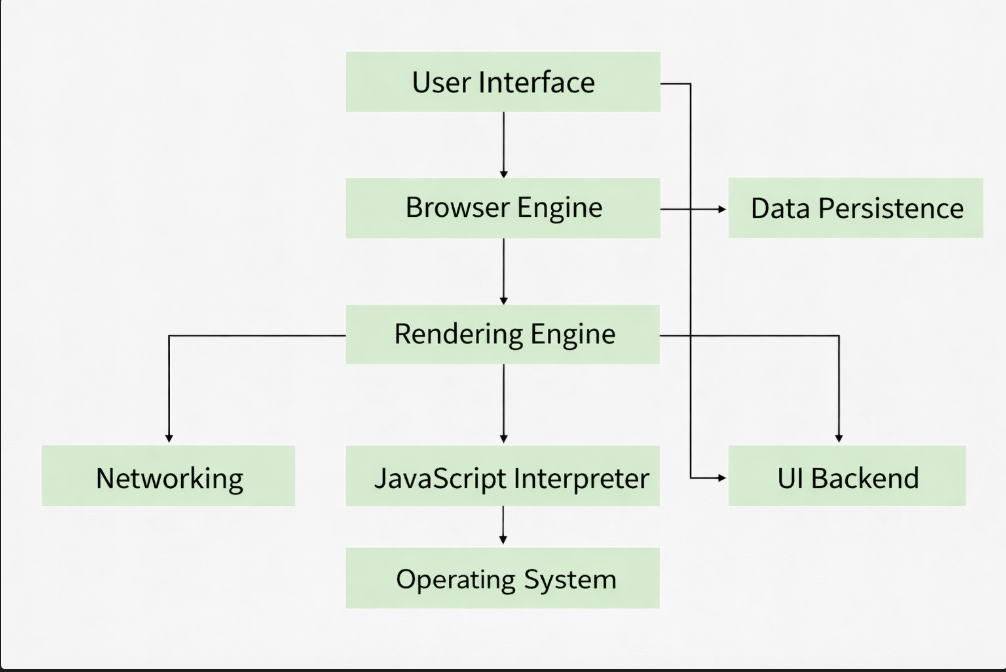
User Interface:
It includes the address bar , bookmarking menu , search button , etc. Every aprt of the browser display , the screen you are seeing is the user interface , except the requestd page.
Browser Engine:
It is a bridge between web page’s code i.e, HTML,CSS,JS and the visual experience you see on the screen. It retrives and displays web pages and its content from the web server.
Rendering Engine:
It is responsible for displaying requested content. The rendering engine parses HTML and CSS and displays the parsed content on the screen.
Networking :
It is for networking calls such as HTTP requests.
UI backend:
It is used for drawing basic widgets like combo boxes and widgets. The browser itself cannot draw on screen. UI backend direcly talks to the OS , each OS can draw diffferently like windows , macOS can display same thing differently.
Javascript Interpretor:
Used to parse and execute Javascript Code.
Data Storage:
This is a persistence layer. The browser need to save various kind of data such as cookies , some data need to be stored locallly (localstorage).
Browser Engine vs Rendering Engine
Browser Engine:
Acts as the controller / coordinator of the browser
Receives actions from the User Interface (URL input, clicks, navigation)
Decides what needs to happen next
Coordinates between:
Rendering Engine
Networking
UI Backend
Data Persistence
Initiates page loads and navigations
Decides whether to use cached data or network requests
Manages browser-level state (tabs, page lifecycle)
Triggers rendering updates when needed
Does not parse HTML or CSS in detail
Does not draw pixels on the screen
Browser engine handles the initial request to load a web page and coordinates resourses needed , manages browsing actions like reloading , going back and forward to the pages , displays error messages , bts calculate the precise position and appearence of every element on page using html and css.
Eg. Blink , Gecko, Servo
Rendering Engine:
Responsible for displaying web content
Parses HTML → DOM
Parses CSS → CSSOM
Combines DOM and CSSOM to create the Render Tree
Calculates layout (reflow)
Paints pixels to the screen
Updates visuals when DOM or CSS changes
Handles re-rendering on resize, scroll, or style changes
Focused purely on how the page looks
Does not manage navigation or browser UI logic
It interprets HTML, CSS, JS and turns then visullay displays them on a webpage. Different browsers use different engine so same thing can be displayed in different way on different engines.
Networking: how a browser fetches HTML, CSS, JS
Its main task is to send and recieve HTTP request. When a browser engine decides a resource is needed , i t helps in converting domain name to IP address using DNS and establishes a connection with the server.
Sends a HTTP request for a specific resource and recieve HTTP response containing file data , pass the recived bytes to browser for further processing.
Networking does not interpret HTML, CSS, JS. It streams data so rendering can begin before full download completes. Networking’s only job is to fetch resources from the internet and it do not care those resources contain.
HTML parsing & DOM creation
HTML parsing:
Parsing begins when browser recives HTML from the netwrok . HTML is treated as plain text , then rendering engine reads HTML from top to bottom.
Text is broken down according to tags attributes , content. Browser checks wether tags open close or nest. Parsing happens incremently as the data arrives.Parsing only focuses on understanding structure not styling. Output of parsing is a set of structured nodes.
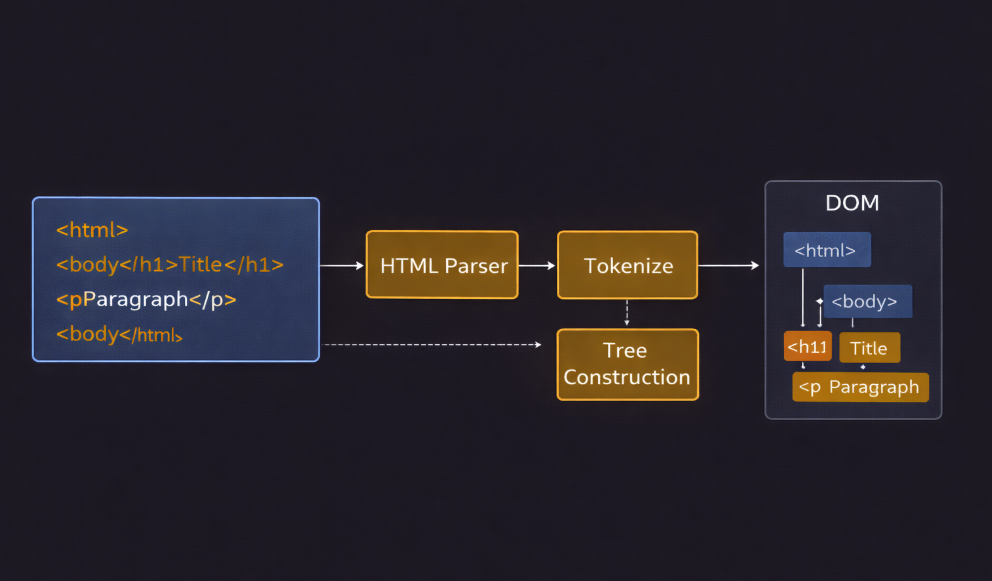
Dom creation:
The nodes created during parsing are arranged into tree structure, this tree is called DOM (Document Object Model).
The root of tree is called ‘Document’ object.
Each HTML element becomes a DOM node. Text conent becomes text nodes. The parent child relationship in the tree is followed accroding to HTML nesting.Dom represents the logocal structure of page.Changes in dom may trigger layout and repaint.
CSS parsing and CSSOM creation
CSS parsing:
Parsing begins when the browser receives CSS from the network or from <style> tags. CSS is treated as plain text, then the rendering engine reads CSS rule by rule.
Text is broken down into selectors, properties, and values. The browser checks which rules are valid and understands how they apply. Parsing focuses on styling information only, not structure.
CSS parsing also happens incrementally as the data arrives. The output of parsing is a set of structured style rules.
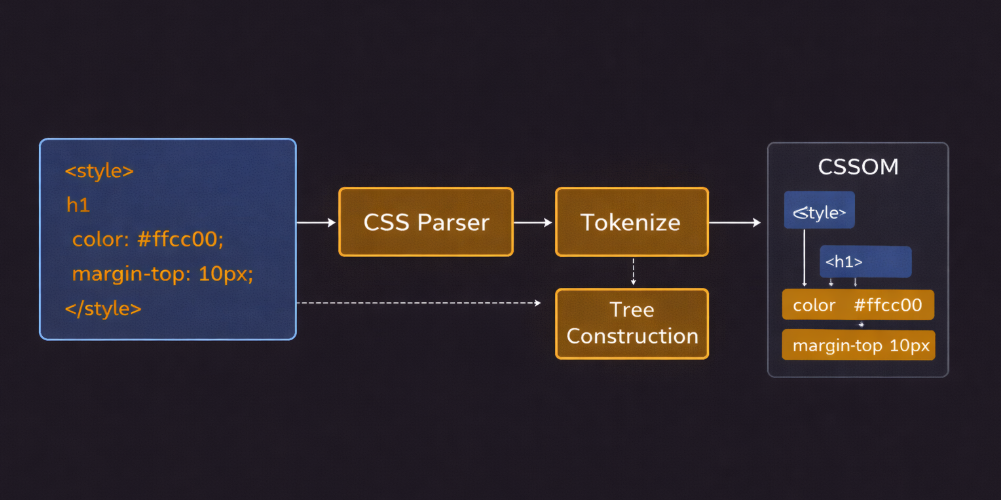
CSSOM creation:
The parsed CSS rules are organized into a tree-like structure called the CSSOM (CSS Object Model).
CSSOM represents all the styles of the page, including inherited and computed values. Each node contains information about which styles apply to which elements.
CSSOM works together with the DOM to decide how elements should look. Changes in CSS or styles may trigger layout and repaint.
DOM + CSSOM → Render Tree
Once the DOM and CSSOM are ready, the browser combines them to create the Render Tree.
The Render Tree contains only the elements that will actually appear on the screen. Elements with display: none are not included, while visible elements are.
Each node in the Render Tree contains:
A reference to a DOM element
The computed styles from the CSSOM
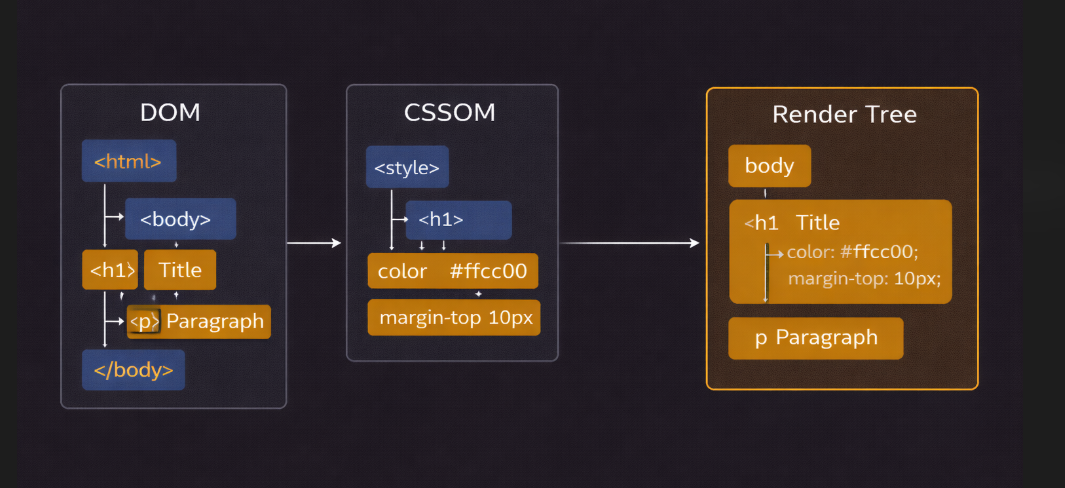
The Render Tree represents what needs to be rendered visually, not the full document structure.
The Render Tree is used as the input for the layout process. Any change in DOM or CSSOM can cause the Render Tree to be updated, which may trigger layout and repaint.
Very Basic Idea of Parsing:
Parsing means breaking something into parts to understand its structure and meaning.
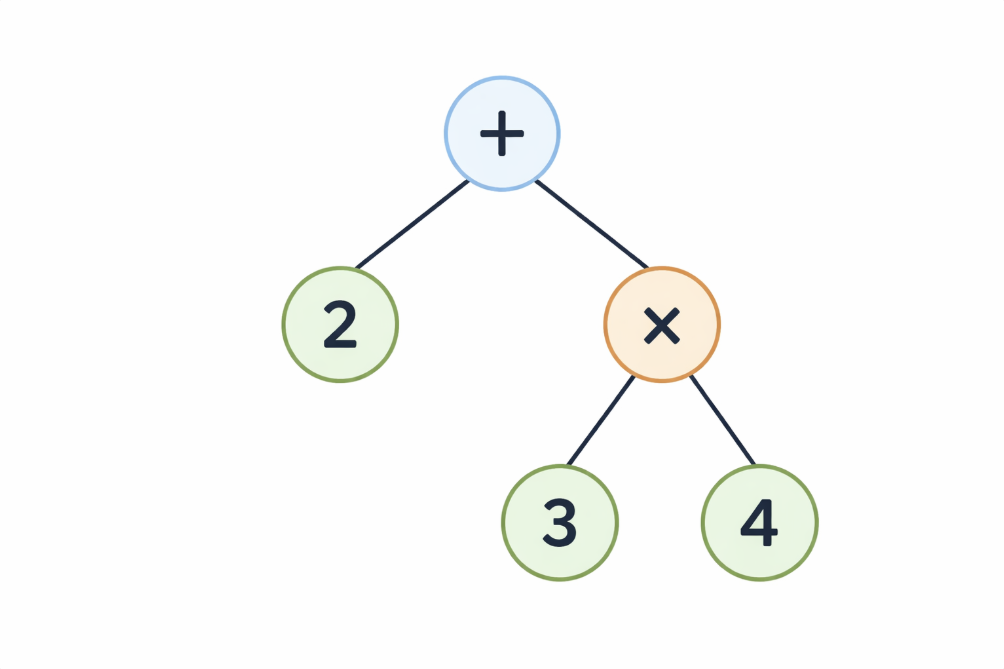
For eg . this expression: 2 + 3 × 4
It looks like a plain text but to evaluate it we need to parse it . These expressions follow BODMAS rules so according to that it will be parsed.
During parsing numbers and operators are identified and then order of operations is understood like here rules are of BODMAS , and accroding to that structure is formed.
Layout(reflow), painting and display
Layout:
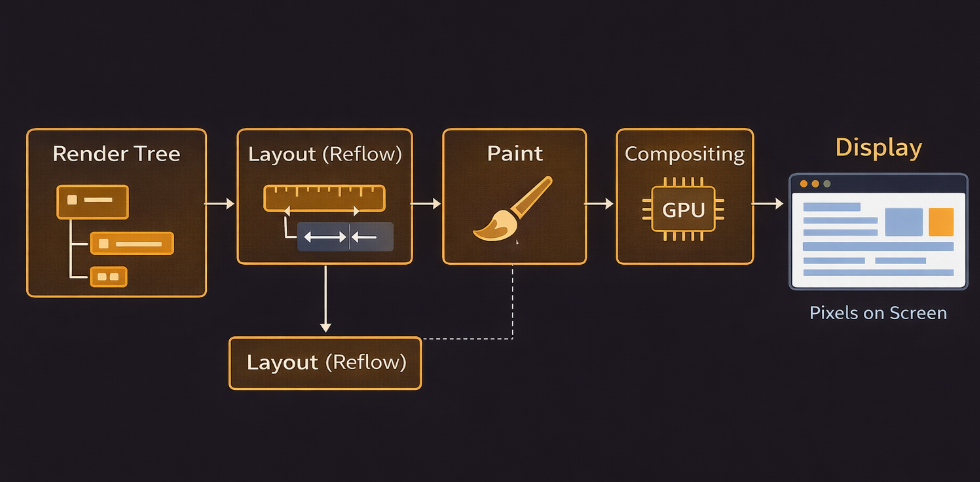
Once the render tree is created , the browser calculates the size and position of each visible elemnet.
The browser determines width and height of elements, position of elements on the screen, spacing margins and padding.
The process is called layout or reflow. Layout depends on viewport size, font sizes and content length. Changes to layout-related properties can trigger reflow, which is a costly operation.
Painting:
After layout is complete, the browser starts painting. Painting means filling in pixels for text , colors, backgrounds, borders, images, shadows, etc. Each visual part of an element is drawn in the correct order. Painting does not decide positions, it only draws based on layout calculations.
Display:
Once painting is done, the final pixels are sent to the screen.
The browser displays the painted content to the user. Any future changes (scrolling, animations, DOM updates) may cause parts of the page to be repainted or reflowed again.
Therefore, A web browser is much more than a tool that “opens websites.” Behind the scenes, it is a carefully designed system where multiple components work together — networking fetches resources, parsers understand HTML and CSS, the DOM and CSSOM define structure and style, and the rendering engine turns everything into pixels on the screen. You don’t need to memorize every step or component at once. What matters is understanding the flow: from URL → content → structure → style → layout → paint.
Comments
Join the discussionNo comments yet. Be the first to comment.


