

Linux From Root: File System Exploration

Most operating systems hide their complexity. Linux does the opposite—it quietly exposes everything, but only if you know where to look.
So lets start from / and explore Linux like a system investigator. It isn't just structure—it is a set of design ideas that make Linux insanely powerful (and fun to play with.
/ — root
The first thing that hits you is that everything lives under /.
No C drive. No D drive. No “this is separate from that.”
What it does: It’s the starting point of the entire filesystem
Why it exists: To keep everything unified
Problem it solves: No fragmentation, no confusion about “where things belong”
At first, it feels small. But then you realize—this is why Linux feels connected. Your files, system configs, running processes, even hardware representations—they’re all part of the same tree.
Insight:
Linux doesn’t treat your system like compartments. It treats it like a single organism.
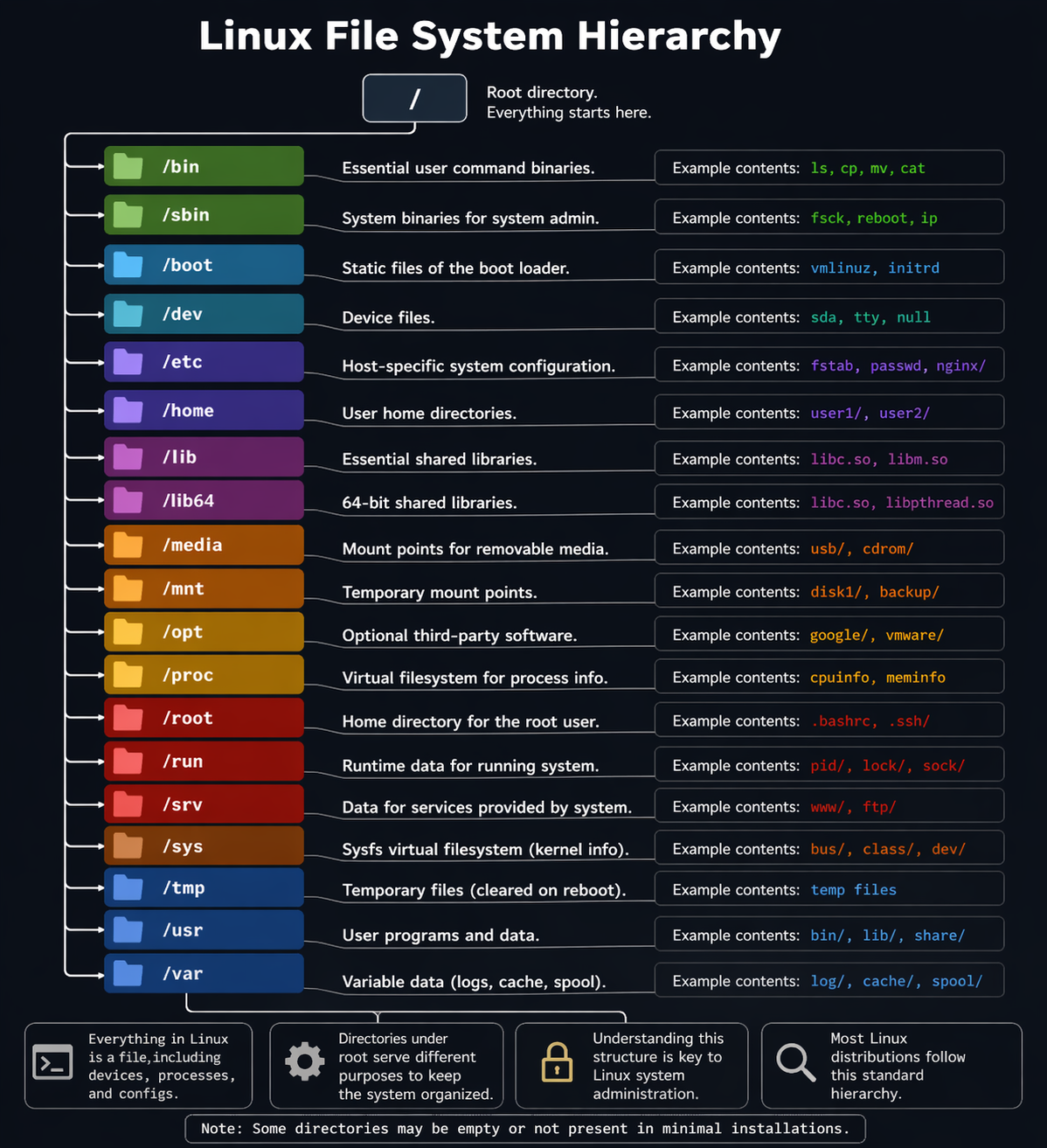
/etc: The Hidden Control Panel
One of the most surprising discoveries was /etc. It doesn’t contain programs—it contains decisions.
Linux separates logic from behavior. Programs do the work, but /etc tells them how to behave. This means the system isn’t dynamically figuring things out—it’s following instructions written in plain text.
That’s powerful on its own. But what makes it fun is how much control you get.
You can literally rewrite how parts of your system behave without touching any code. Want to change how a service runs? There’s a file for that. Want to tweak system startup? It’s in here.
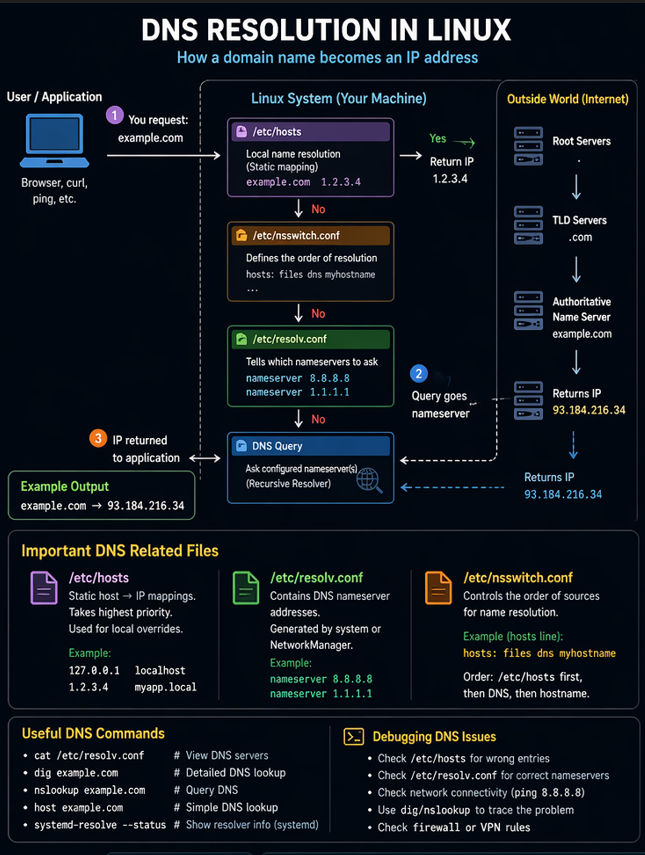
Interesting hack: You can override domain resolution locally using /etc/hosts.
Map a real domain to a fake IP, and your system will believe it. It’s like creating your own mini internet rules—locally.
DNS: A Decision Pipeline, Not a Lookup
Typing google.com feels instant, but Linux doesn’t treat it as a simple lookup. It follows a chain of decisions.
First, it checks if the answer is already known locally. If not, it consults configured DNS servers. Even the order of these checks is customizable.
This makes DNS in Linux surprisingly flexible.
Interesting hack: You can simulate production environments locally by mapping domains to localhost.
For example, making myapp.com point to your local server lets you test things exactly like production—without deploying anything.
That’s not just useful—it’s clever system design.
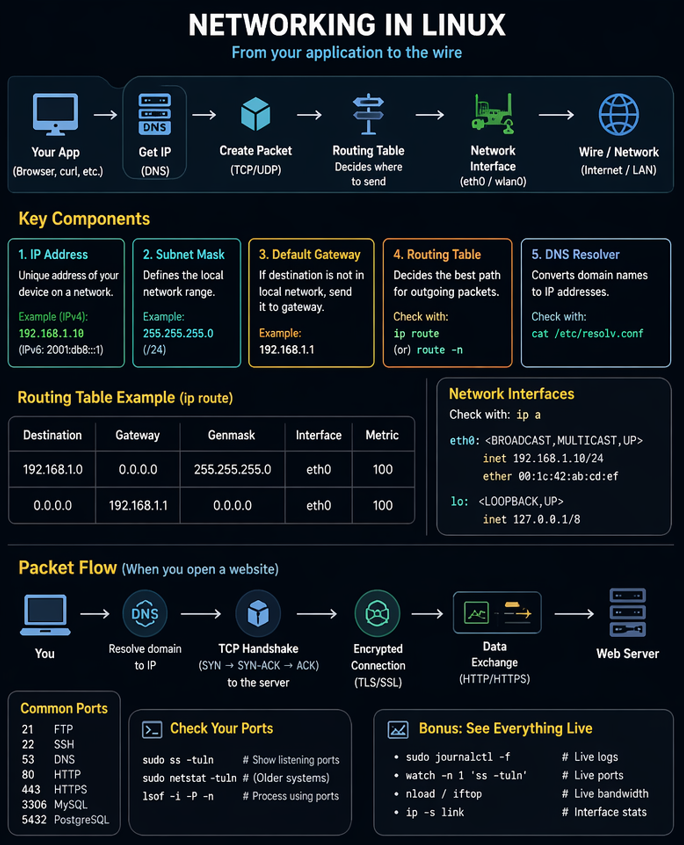
Routing: Linux Doesn’t Know the Internet
One of the most mind-bending realizations was this:
Linux doesn’t “know” the internet.
It only knows:
its local networks
and one default gateway (your router)
Everything else is simply forwarded. That’s it.
This makes networking feel less magical and more like a rule-based system.
Interesting hack: When you connect to a VPN, Linux doesn’t switch worlds—it splits traffic.
Some requests go through the VPN, others go through your normal connection. It’s like running two realities at once, controlled entirely by routing rules.
Interfaces: Even Localhost Is a Network
Another shift in thinking came from network interfaces.
I used to think networking meant “internet.” But Linux treats even internal communication as networking.
localhost isn’t a shortcut—it’s a real network interface inside your system.
So when your frontend talks to your backend on localhost, it’s not a direct function call—it’s a network request traveling through an internal interface.
Interesting hack: Because interfaces are abstract, you can create fake networks inside your system.
This is exactly how tools like Docker isolate applications—they build entire virtual networks without any physical hardware.
Logs: The System’s Diary
Linux doesn’t just run—it remembers.
The /var/log directory stores a continuous stream of system activity. Not just errors, but everything from service startups to background events.
At first, logs seem noisy. But once you understand them, they become incredibly powerful.
They tell you:
what happened
when it happened
and often why
Interesting hack: Logs let you “time travel.”
If something breaks, you don’t have to guess—you can reconstruct the exact sequence of events that led to it.
It’s like reading the system’s diary.
Users: Identity as Data
Another interesting discovery was how Linux handles users.
Users are not hidden entities. They are defined in files. Their existence, permissions, and authentication details are all stored as structured data.
This makes the system transparent and scriptable.
Interesting hack: Because users are file-based, you can automate identity management.
You can create, modify, or replicate users across systems just by working with data—no GUI required.
Permissions: Security Built Into Every File
Security in Linux isn’t an add-on—it’s part of the filesystem itself.
Every file carries its own permissions. Who can read it, modify it, or execute it is defined at the file level.
This creates a deeply integrated security model.
Interesting hack: You can create isolated environments just by controlling permissions.
Without installing anything extra, you can restrict access, sandbox users, and protect critical parts of the system.
It’s simple, but incredibly effective.
/proc: Watching the System Think
/proc was probably the most fascinating part of this exploration.
It looks like a directory, but it doesn’t actually store files. Instead, it exposes the live state of the system.
Processes, memory usage, CPU info—all appear as files, but they are generated in real time by the kernel.
You’re not reading stored data—you’re observing a system in motion.
Interesting hack: You can peek inside running processes.
See what they’re doing, what files they’ve opened, how much memory they use—all without stopping them.
It’s like inspecting a running engine while it’s still working.
/dev: Hardware, Simplified
Hardware is messy. Different devices, different protocols. Linux solves this by turning everything into files under /dev.
A disk, a keyboard, a terminal—they’re all accessed the same way.
This removes complexity and creates a uniform interface.
Interesting hack: There’s a special file called /dev/null.
Anything you send there disappears.
It’s literally a “black hole” for data—useful when you want to ignore unwanted output.
Final Realization
Starting from / changed how I see Linux.
It’s not just a command-line system. It’s a system where:
behavior is visible
state is observable
hardware is abstracted
history is recorded
And most importantly:
nothing is hidden


