

How DNS Resolution Works
What is DNS:
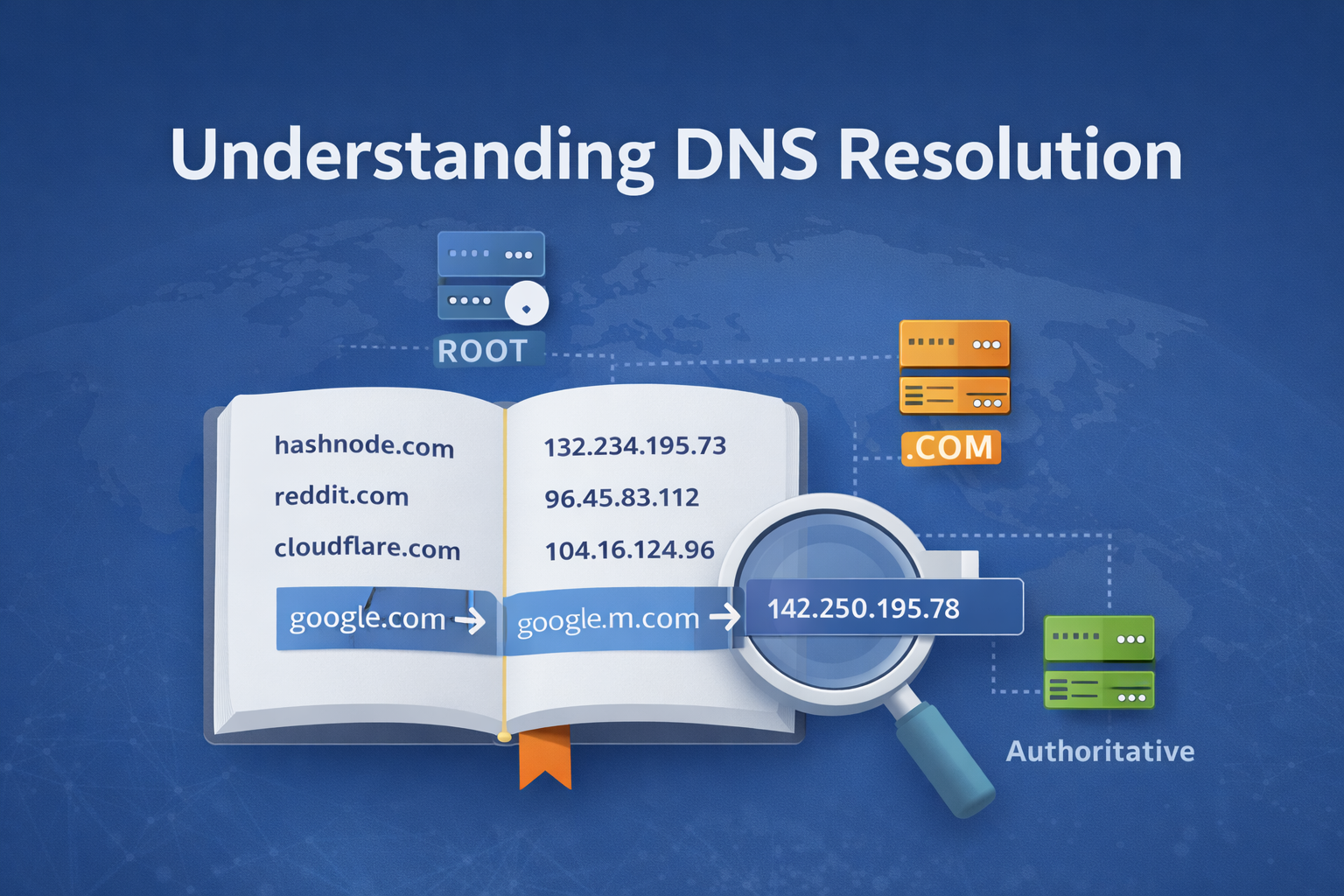
DNS means Domain Name System. DNS acts as a phonebook of the internet. When we request the browser for any website or domain name like hashnode.com, reddit.com, systems don’t understand these domain names which are human readable; instead, they communicate through IP addresses like 132.234.195.73.
DNS exists to translate domain names to IP addresses. DNS maps IP addresses to hosts connected either to the public or private internet via a process called DNS resolution.
Overall, DNS is a distributed, hierarchical, globally replicated phonebook designed for scale and speed.
DNS Resolution:
The process of DNS resolution involves converting a hostname (www.example.com) into a computer firenndly IP address such as (192.168.1.1). This consists of severel steps and different hardware component.
There are 4 DNS servers involved in loading a webpage:
Recursive resolver: Here client (resolver) asks DNS server to return final answer , means now its server responsibility to complete lookup on behalf of client.
Root Nameserver : First step in translating human readable host name to IP address.They are represented by dot (.). They answer who handles eg. .com domains.
TLD nameservers: Top Level Domain server is next step in search of IP and it hosts the last portion of hostname like in example.com , the TLD server is ‘com’.
Authoritative NS : The final nameserver belong to the owners of domain such as in example.com 'example’ , Google , Amazon , etc. They provide the final IP address.
Steps of Resolution:
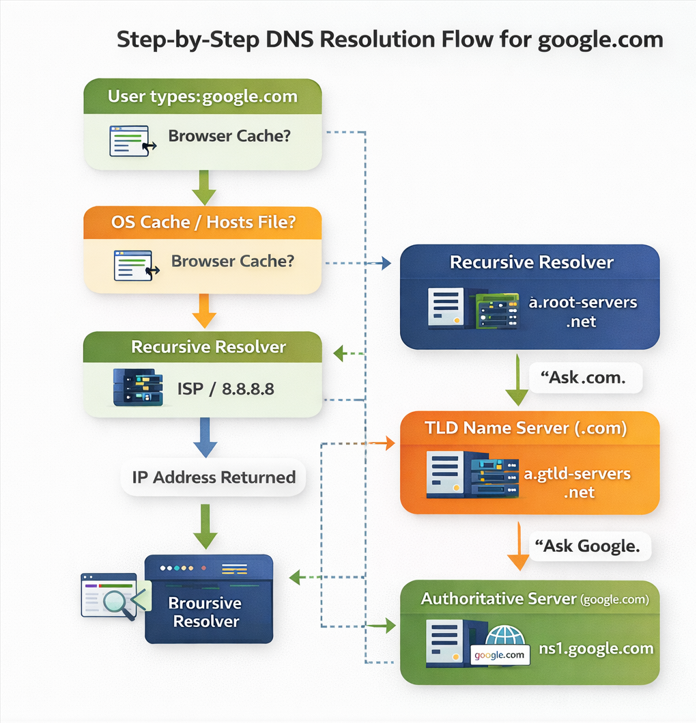
When a user enters a domain name like google.com severel steps occur behind the scenes:
Step 1: Browser Cache Check
The browser first checks its internal DNS cache.
If the domain was recently visited
And the cached record has not expired (TTL)
The IP address is returned immediately
No DNS query is made
Step 2: Operating System Cache Check
If the browser does not have the record, it asks the operating system.
The OS checks:
Local DNS cache
Hosts file
If found → resolution stops here.
Step 3: Query Sent to Recursive DNS Resolver
If no local record exists, the OS sends the query to a recursive DNS resolver.
This resolver is usually provided by:
ISP
Public DNS
The resolver is responsible for finding the final answer.
Step 4: Recursive Resolver Queries Root Name Servers
If the resolver has no cached answer, it queries a Root Name Server.
Root servers respond with:
A list of TLD (Top-Level Domain) name servers
Example: servers responsible for .com
Root servers do not return IP addresses.
Step 5: Resolver Queries TLD Name Servers
The resolver then queries the TLD name server (e.g .com).
The TLD server responds with:
- Authoritative name servers for the requested domain
Still, no IP address is returned at this stage.
Step 6: Resolver Queries Authoritative Name Servers
The resolver now queries the authoritative DNS server for the domain.
The authoritative server responds with:
The final DNS record (A / AAAA)
Example: google.com → 142.250.195.78
This server is the source of truth for the domain.
Step 7: Response Is Cached
The recursive resolver:
Stores the result in cache based on TTL
Sends the IP address back to the OS
The OS and browser may also cache the response.
Step 8: Browser Connects to the Server
With the IP address resolved:
Browser establishes a TCP connection
Performs TLS handshake (for HTTPS)
Sends the HTTP request
DNS resolution is now complete.
Nameserver records (4):
NS stands for ‘nameserver,’ and the nameserver record indicates which DNS server is authoritative for that domain . Basically, NS records tell the Internet where to go to find out a domain's IP address. NS records define who controls the DNS for a domain. They point to the servers that know the correct DNS information.
Example
For the domain:
google.com
NS records look like:
ns1.google.com
ns2.google.com
ns3.google.com
ns4.google.com
NS records do not answer DNS questions directly.They enable the process by pointing to the correct authority. Without NS records, DNS would have no structure, no delegation, and no scalability.
dig
dig (Domain Information Groper) is a DNS diagnostic tool used to query DNS servers and inspect DNS records directly. dig shows which DNS servers are involved, what records are returned, how DNS delegation works step by step.
When dig is used:
dig is commonly used to:
Debug DNS issues
Verify DNS configurations
Understand how DNS resolution works
Check NS, A, CNAME, MX, TXT records
Troubleshoot production outages
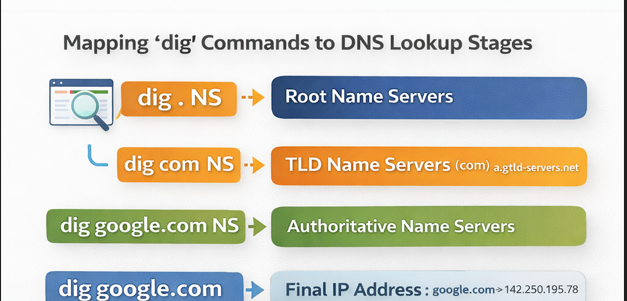
Understanding dig . NS — Root Name Servers
Command
dig . NS
What This Query Means
. represents the DNS root zone
NS asks: Which name servers are responsible for the root?
What the Output Represents
The response contains entries like:
a.root-servers.net
b.root-servers.net
c.root-servers.net
These are the root name servers of the internet.
Key Points About Root Servers
Root servers sit at the top of DNS hierarchy
They do not know IP addresses
They only know which TLD servers exist
Their role is to answer questions like: “Who handles .com domains?”
Understanding dig com NS — TLD Name Servers
Command
dig com NS
What This Query Means
- Asking the root: Who manages the .com domain?
What the Output Represents
You’ll see servers such as:
a.gtld-servers.net
b.gtld-servers.net
These are Top-Level Domain (TLD) name servers for .com.
Role of TLD Servers
TLD servers:
Manage all domains under .com
Do not know website IP addresses
Store NS records for second-level domains
They answer: “Which name servers are authoritative for google.com?”
Understanding dig google.com NS — Authoritative Name Servers
Command
dig google.com NS
What This Query Means
- Asking the .com TLD servers: “Who is responsible for google.com?”
What the Output Represents
Example response:
ns1.google.com
ns2.google.com
ns3.google.com
ns4.google.com
These are Google’s authoritative name servers.
Why These Servers Matter
They hold the actual DNS records
They are the final authority for google.com
Any change to google.com DNS happens here
At this point, DNS delegation ends.
Understanding dig google.com — Full DNS Resolution
Command
dig google.com
What This Query Returns
You receive an A record:
google.com. 300 IN A 142.250.195.78
This is the IP address your browser needs.
What Actually Happened Behind the Scenes
Even though you ran one command, the recursive resolver performed:
Query root servers → get .com NS records
Query .com TLD servers → get google.com NS records
Query Google’s authoritative servers → get IP address
This entire chain is usually invisible to users.
DNS resolution is a hierarchical delegation process where each layer uses NS records to guide queries until the authoritative server returns the final IP address.


